Automated Health Checks
Scaling/democratizing tribal knowledge to improve customer outcomes.

Overview
Internally, a tool exists to parse a tech support file (.tar.gz) so support agents are able to better see ongoing configuration issues. A tiger team was created to add functionality to this tool to parse the .xml config data, as well as some of the configuration flags within the database .bak archive.
Using those two data sources insights are derived (i.e. you installed license X we see in the DB but no X objects exist in the XML) for correlation analysis. The analysis and output ultimately got named PIANO.
At the time, an enterprise product most of my customers owned collected no telemetry in how it is deployed or used. Simple questions a customer might ask included "did we install X license to our production environment?" or "we installed the license, is it configured properly?"
Many times, these discussions proved difficult to answer without spending time with them on a call, pulling up the interface, and clicking through it together. This works well if you know the product well, what about ramping technical sellers who don't?
With licensing occurring offline, another obstacle exists: if a customer downloads the list of their licenses, how might they compare it against what's locally installed?
The business wouldn't opt to collect telemetry, so we are left with an automation challenge: create replicable useful reports from customers using data they are comfortable sharing.
3 Questions Framework
- What is it?
- An analysis engine to standardize health checks
- Why does it matter?
- Ensuring every customer gets a high-quality touchpoint with their account teams, even if they are new
- How does it work?
- A collection of open and closed source software deployed in public cloud in an existing data pipeline (support cases) to coordinate report delivery (CSM suite) and training
Dataset
File Structure
File structure & relevant customer-provided data.
techsupport.tar.gz
├── notes/
│   └── readme.md
└── backup/
    └── db_dump.bak
    └── config.xml
File Analysis
Using xml.sax library with a custom DBHandler to create a stream-parse to build a structured directory (i.e. self.database) by object type. Specifically looking for elements like OBJECT and PROPERTY to process into memory.
For each element, a key value is created (i.e. .com.infoblox.node.ID, .com.infoblox.license_grid_wide, etc) to then parse output. Deserializing elements in this way allows for JSON output, and service status is then able to be correlated from its relevant object within the config.
{
  "license_type": "dns",
  "expiration_date": "2026-12-31",
  "quantity": "25",
  "description": "DNS Query Licenses",
  "parent": "grid-wide",  # or a node reference for member license
  "service_enabled": "true"
}
Cloud Data Sources
Using API calls to Salesforce, it's possible to pull and install base report from the customer account. The serial numbers extracted from the database are tied to accounts, so it is therefore possible to pull all current licenses under an apex account.
Outputs
The original output for all technical sellers to utilize existed as an HTML file. This allowed embedding video, rich document linking, and relatively easy syntax highlighting and iconography through bootstrapping. This report is never intended to be customer-facing, but rather, a guide for what may be useful to discuss as preparation prior to a health check meeting.
PIANO
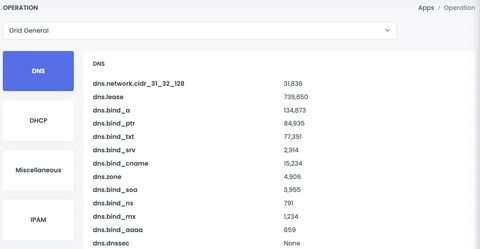
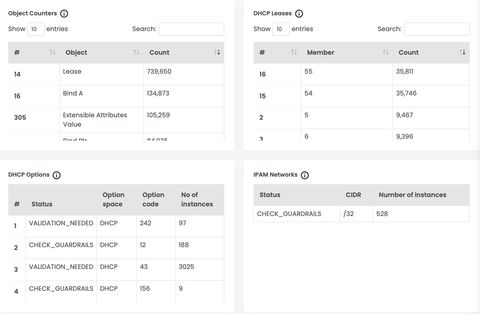
In general, most outputs from the HTML existed as tables. For example:
| Num | Kind | Feature | Serial | Expiry | SW SKU | Host Name | License String |
|---|---|---|---|---|---|---|---|
| 1 | Static | DNS | 00121... | 01 JAN 2026 | IB-SW-NS1 | ns1.example.com | EQAAAG7ph+... |
| 2 | Dynamic | SUP | 00131... | 01 JAN 2026 | IB-SW-BASE | ns1.example.com | EgAAAG8dg=... |
| 3 | Static | DHCP | 00141... | 01 JAN 2026 | IB-SW-NS1 | ns1.example.com | GgAAA732*g... |
| Num | Type | Platform | Disk | CPU | Memory | Host Name | Role |
|---|---|---|---|---|---|---|---|
| 1 | VM | 2225 | 101 GB | 16 | 24 GB | ns1.example.com | Grid Manager |
| 2 | HW | 1425 | 825 GB | 8 | 16 GB | ns2.example.com | Stealth Primary |
| 3 | HW | 1415 | 825 GB | 8 | 16 GB | ns3.example.com | Lead Secondary |
In some cases, the elements were rendered in rich text. This allowed engineering to create 'guardrails' to notify account teams of potentially risky configuration items.
License Analysis
I then wrote MAESTRO to take the HTML table from the license output of PIANO, and compare that to the HTML table output from Salesforce to identify orphaned (i.e. unapplied) licenses to output as CSV, or be run via CLI (for eventual import into PIANO backend):
Total Members: 139

Breakdown by Member Type and Model:

HW:
  IB-4015: 13
  PT-4000: 1
  IB-1415: 24
  IB-2215: 4
  IB-1425: 29
  IB-825: 43
  IB-4005: 1
  IB-2225: 13

AWS:
  CP-V1405: 2

KVM:
  IB-V825: 1

AZR:
CP-V1405: 8| AssignedBaseModel | IB-SW-BASE-CP-1400 | IB-SW-CP | IB-SW-GD | IB-SW-NS1 | IB-SWTL-ADNS | IB-SWTL-GD | IB-SWTL-BASE-CP-1405 | IB-SWTL-CNA | IB-SWTL-CP | TR-SWTL | IB-SWTL-BASE-NIOS-4015 | PT-SUB-ADP |
|---|---|---|---|---|---|---|---|---|---|---|---|---|
| 1400 | 2 | 1 | 2 | 4 | 2 | 1 | 0 | 0 | 0 | 0 | 0 | 0 |
| 1405 | 0 | 1 | 2 | 4 | 2 | 1 | 2 | 0 | 0 | 0 | 0 | 0 |
| 4105 | 0 | 1 | 2 | 4 | 2 | 1 | 0 | 0 | 0 | 0 | 2 | 0 |
Configuration Analysis
Below is an example output from some of the configuration analysis derived from items analyzed.
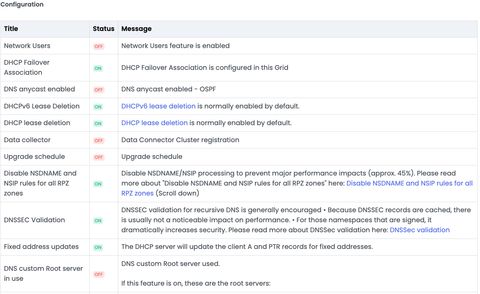
Ultimately, these tools would be ingested into the internal tool to run whenever a customer uploaded a backup, either for a support case or for an ongoing health check. This streamlined the workflow to ensure manual uploads/downloads/API calls aren't needed to run, but rather the report is always generated.
Appendix
Links
Notes
Eventually and sadly, PIANO would be sunset in favor of a new python/flask based app that ran in real time against our data lake. Health checks mostly then revolved around ensuring customers opt in to the data lake.
For NIOS/the offline product there is no impact to number of queries or leases on licensure cost. For the SaaS managed and true SaaS variants of the platform, our COGS increase through customer utilization. Some clients do not honor their DHCP T1/T2 renew lease timers (vendors making non RFC-compliant devices), which in some cases may drive up utilization via additional DHCP leases or designated DNS resolver (DDR) queries.
The above link to BICEP for a short time became part of the health check process for customers with that product until a time its functionality got absorbed into the product natively.
We estimated this project saved ~8,000 hours annually across support, world wide field operations, and engineering.
Spot a typo or want to suggest a change? Edit lands as a PR against the public mirror.