Automated Activity Tracking
Reducing the opportunity cost of high-fidelity logging.
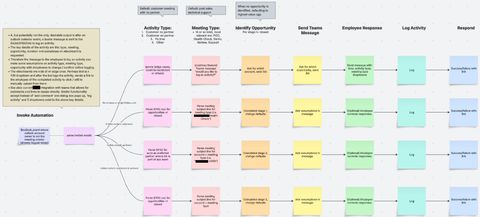
Note: To date, this project is the highest improvement to quality of life of field employees. Offloading menial work to create opportunity for higher impact interactions, while also equipping the business to make better decisions.
Overview
Technical leadership prefer data-driven decisions. Answering questions like "how much incremental revenue did my employees influence this quarter" or "which activities are leading to faster deal cycles" among others, are difficult without a vast and trustworthy dataset.
Frequently, in pre-sales there are activities that are both customer facing (demonstrations, proof of concepts, etc.) as well as completed asynchronously (creating a demo environment, creating the architecture for a bill of materials, talking through line items with resellers, etc.) not all of which follow a common format to identify how someone spends their time.
Although there are other use cases, in general, driving business intelligence from field operations requires effort. In most cases, a company may expect their employees to manually log an activity. This creates a high opportunity cost of compliance at the cost of potentially lower quality, delayed, or missing data. This is avoidable.
You may be asking, "hey, what kind of $CRM doesn't automate activity tracking?" It does! Integrations through email and others. Unfortunately, these integrations aren't great when you are invited to a meeting (not the host), or you don't send an email at all, it's a phone call, for example. Let's examine!
3 Questions Framework
- What is it?
- A bot that 'guesses' which activities you complete and what they are related to
- Why does it matter?
- Reduce burden of low-value work compared to high-impact activities
- How does it work?
- Parse data sources (email, collaboration suite tools, etc), feed into LLM, LLM pre-populates a card and the user confirms the guess before sending off
Activity Tracking - Current State
The curly brackets {} denote the number of clicks required to complete each step (on average). The general flow to log an activity is as follows: 1. open a browser to $CRM (you will need to log in if you aren't already) {3}, 2. type the name of the customer into the $CRM {2}, 3. click the correct account {1}, 4. open the opportunities in the account {1}, 5. click the opportunity your activity is related to {1}, 6. scroll down and click 'activity' on left side of screen {1}, 7. click 'create activity' {1}, 8. fill out activity subject {2}, 9. fill out activity type {2}, 10. input attendee information {2 per}, 11. start date and time {4}, 12. end date and time {4}, 13. add description {1}, 14. (activity dependent) upload files {2+}, 15. click save {1}.
Congratulations, you've completed your first activity! 30 clicks on average for two attendees. If you've recently accessed this account or opportunity, you know keyboard shortcut / arrow key commands, you optimize this to 20 or so.
Definitions
In step 8, an activity subject is a scroll bar in which it is specified if a partner/reseller contact is attending the meeting, if the account you're meeting with is a new or existing customer, is only a reseller/partner activity, or none of the above.
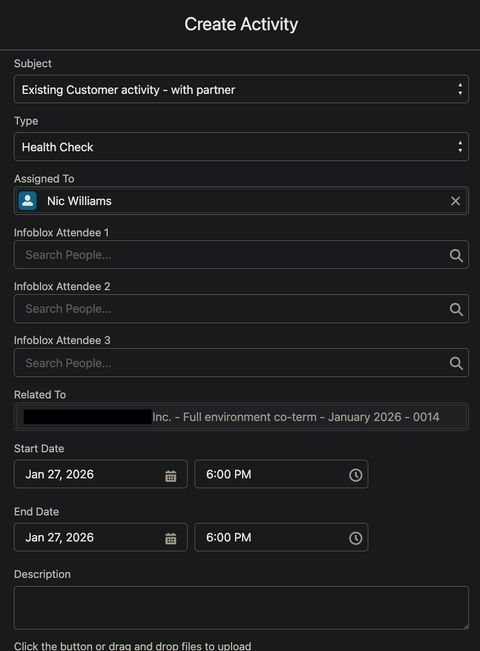
In step 9, the activity type is work itself. Is this a demonstration? Proof of concept? Hands-on workshop? Health check? Penetration test / security audit? 32 total options, some are customer-facing, others are asynchronous (pre-sales activity preparation, for example).
Reporting
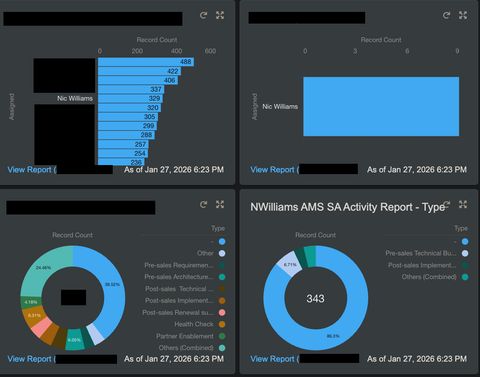
Once activities are logged, you are then able to see detailed outputs of the completed activities. These activities are tied to opportunities, which are tracked in $ as well as days open. With enough data, it's then possible to create educated guesses on the highest-impact activities.
Solution
It is possible to train an LLM to identify types of activities based on slides, emails, kanban/workflow tasks, and others. Then send these guesses to a human for validation. This is over a 10X average reduction in time spent to log an activity.
Essentially, an automation flow can 'see' your calendar with the right permissions. The calendar event title, body of the email (usually includes meeting agenda), attachments, and more are all ingested. Of the 15 steps above, the data of steps 2-5 and 8-13 are all correlated with assistance from seeing those on the meeting invite. Does their email domain belong to a $CRM account? Is that account status existing or net-new customer? Is there a third or other email domain attached to a $CRM account with status as a partner?
Data
The total flow is over 50 individual steps, but many are duplicated to different data providers, or different variables within the data (i.e. look for $customer within $CRM and $collaboration_suite). The first step is allowing the bot to impersonate the end user across $CRM, email, collaboration suite, and others. We went a step further to allow a user to specify a date range (if they are months behind and needed to go further back than default).
{
  "type": "InitializeVariable",
  "inputs": {
    "variables": [
      {
        "name": "startTime",
        "type": "string",
        "value": "@formatDateTime(addHours(variables('endTime'), if(or(equals(trim(string(variables('varHours'))), ''), equals(variables('varHours'), null)), -24, int(variables('varHours')))), 'yyyy-MM-ddTHH:mm:ss.fffZ')\n"
      }
    ]
  },
  "runAfter": {
    "No_account": [
      "Succeeded"
    ]
  },
  "metadata": {
    "operationMetadataId": "00-deadbeef-00"
  }
}
From there, API calls to create graphs of the relevant data from each source.
{
  "type": "Http",
  "description": "Pull events - email",
  "inputs": {
    "uri": "https://graph.example.com/v1.0/users/@{triggerBody()?['email']}/calendar/calendarview",
    "method": "GET",
    "headers": {
      "Authorization": "Bearer @{body('Parse')?['access_token']}",
      "Accept": "application/json"
    },
    "queries": {
      "$select": "id,subject,start,end,attendees,bodyPreview",
      "startdatetime": "@{variables('startTime')}",
      "enddatetime": "@{variables('endTime')}"
    }
  },
  "runAfter": {
    "Condition_3": [
      "Succeeded"
    ]
  },
  "runtimeConfiguration": {
    "contentTransfer": {
      "transferMode": "Chunked"
    },
    "paginationPolicy": {
      "minimumItemCount": 500
    }
  },
  "metadata": {
    "operationMetadataId": "00-deadbeef-00"
  }
}
Once the data sources are imported, you'd parse the JSON for relevant variables (invitees, domains of them, etc) which are then used in subsequent variable calls to $CRM to prove existence / denial of that variable. The output is then all fed into an LLM.
{
  "type": "OpenApiConnection",
  "inputs": {
    "parameters": {
      "recordId": "2a568966-c795-4a6b-9668-29963ceaae78",
      "item/requestv2/Timezone": "UTC",
      "item/requestv2/meetings": "@items('For_each')"
    },
    "host": {
      "apiId": "/providers/Example.PowerApps/apis/shared_commondataserviceforapps",
      "connection": "shared_commondataserviceforapps",
      "operationId": "aibuilderpredict_customprompt"
    }
  },
  "metadata": {
    "flowSystemMetadata": {
      "portalOperationId": "aibuilderpredict_customprompt",
      "portalOperationGroup": "aibuilder",
      "portalOperationApiDisplayNameOverride": "AI Builder",
      "portalOperationIconOverride": "https://content.powerapps.com/resource/makerx/static/pauto/images/designeroperations/aiBuilderNew.nonce.png",
      "portalOperationBrandColorOverride": "#DEADBEEF",
      "portalOperationApiTierOverride": "Standard"
    },
    "operationMetadataId": "00-deadbeef-00"
  }
}
Splice the graph and variable data into a single table with an EventID.
{
  "type": "OpenApiConnection",
  "inputs": {
    "parameters": {
      "dataset": "https://example.com/sites/landing-page",
      "table": "XXXXXXXX-XXXX-XXXX-XXXX-XXXXXXXXXXXX",
      "$filter": "EventID eq '@{items('eachCard')?['id']}' and Status ne 'Pending'"
    },
    "host": {
      "apiId": "/providers/example.PowerApps/apis/shared_sharepointonline",
      "connection": "shared_sharepointonline-1",
      "operationId": "GetItems"
    }
  },
  "metadata": {
    "operationMetadataId": "00-deadbeef-00"
  }
}
Output
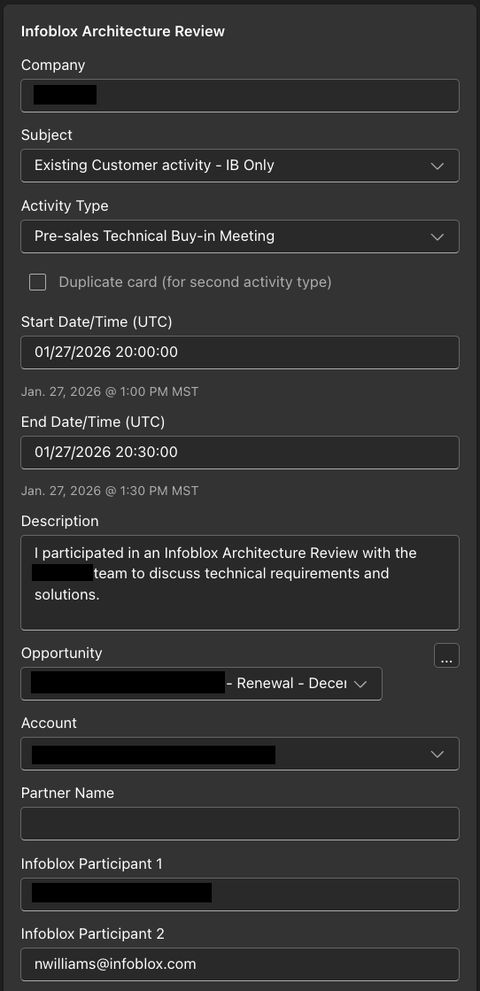
The bot's guess is then spliced into a single active card which is sent to the user. This automation then runs every night, so in the morning yesterday's work is logged and the end-users are fully caught up.
Flow Examples
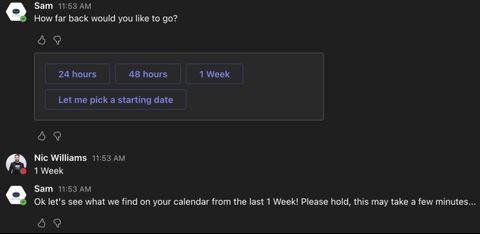
Manual invocation.
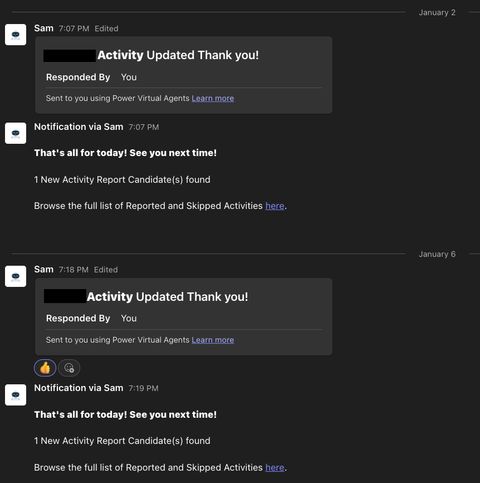
Subscription (auto-run).
Time Study
Let's examine the expected value of this software assuming every employee works 50 weeks per year, earns an average of $150,000, and spends 2 hours per week activity logging for a company of 3,000 employees.
- Hours: 40 hours per week times 50 weeks = 2,000 hours per year
- Rate: $150,000 dollars per year / 2,000 hours per year = $75 dollars per hour
- Value: 2 hours * $75/hour = $150/week * 50 weeks = $7,500 dollars per year
- Savings: $7,500/year * 3,000 employees = $22,500,000 in productivity cost savings per year
More realistically, if you assume sales personnel are 1/5th of the company, and you reduce the average salary by 1/3rd, you still net over $1M per year in productivity gains. This project totalled less than 40 engineering hours.
Spot a typo or want to suggest a change? Edit lands as a PR against the public mirror.