Enriching Graylog with Infoblox
Utilizing an IPAM source to enhance SIEM correlation.
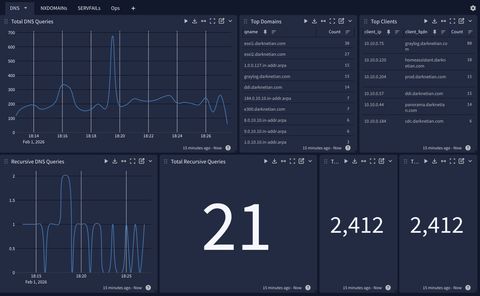
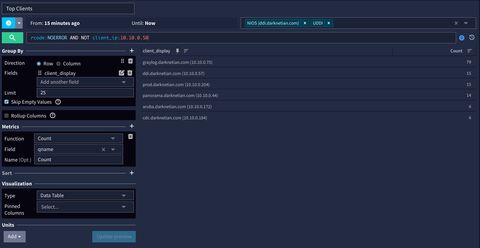
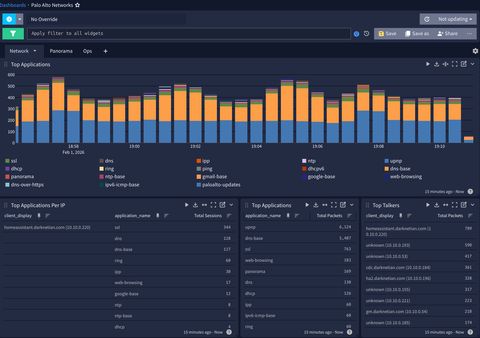
Now that my logging repository is ingesting Infoblox NIOS and Palo Alto Networks logs (previous post here), let's start with enriching the visibility of the logs. You'll notice in the top right corner of the above image, client IP, and fqdn are now visible. This blog post walks through how that's made possible.
You'll notice in the above hero/header picture the ratio of DNS query totals (thousands) to recursive queries (tens) aligns to show a sustained 90% cache hit rate. Of the estimated ~500T daily DNS queries around the world, indeed, > 90% are typically served from cache.
In previous blog posts the recursive query count showed higher, mostly due to the log format originally I used was RAW syslog as opposed to CEF, and counted total messages, not dns_event_type:query. This is since fixed and happy to report a healthy network.
NIOS Enrichment
IPAM
It always bothered me that I went to great lengths to create an authoritative IPAM source, and while Graylog will use reverse DNS to attach a hostname to a log forwarding source, the messages from within those logs do not correlate client_ip to hostname/fqdn. The high-level overview is Graylog supports a function called CSV table lookups, so we will create an API call to NIOS to run often, which Graylog is able to reference and modify the messages with this new data.
Init. for Directory and Scripts
There will be a few lookup tables here, so let's start with the landing zone.
sudo mkdir -p /etc/graylog/server/lookups
sudo chown -R graylog:graylog /etc/graylog/server/lookups
sudo chmod 750 /etc/graylog/server/lookups
Now that the landing zone is created, let's make the WAPI call script.
#!/usr/bin/env python3
import csv
import os
import sys
import ipaddress
import requests
import urllib3
from requests.auth import HTTPBasicAuth

"""
Exports PTR records from Infoblox NIOS WAPI into a Graylog CSV lookup file.

Your environment defaults:
- DNS_VIEW=default
- DOMAIN_SUFFIX=darknetian.com
- SUBNET_CIDR=10.10.0.0/24

Key fix:
- NIOS requires `_return_as_object=1` for paging requests.
  When enabled, response is an object like:
    {"result":[...], "next_page_id":"...", ...}
"""

NIOS_HOST = os.environ.get("NIOS_HOST", "").strip()
NIOS_USER = os.environ.get("NIOS_USER", "").strip()
NIOS_PASS = os.environ.get("NIOS_PASS", "").strip()
WAPI_VER  = os.environ.get("NIOS_WAPI_VER", "v2.13").strip()
VERIFY_TLS = os.environ.get("NIOS_VERIFY_TLS", "true").lower() in ("1", "true", "yes")

DNS_VIEW = os.environ.get("DNS_VIEW", "default").strip()
DOMAIN_SUFFIX = os.environ.get("DOMAIN_SUFFIX", "darknetian.com").strip().lower().rstrip(".")
SUBNET_CIDR = os.environ.get("SUBNET_CIDR", "10.10.0.0/24").strip()

OUT_PATH = os.environ.get("OUT_PATH", "/etc/graylog/server/lookups/ip_to_ptr.csv").strip()

PAGE_SIZE = int(os.environ.get("PAGE_SIZE", "5000").strip())
TIMEOUT_S = int(os.environ.get("TIMEOUT_S", "60").strip())

def die(msg: str, code: int = 1):
    print(f"ERROR: {msg}", file=sys.stderr)
    sys.exit(code)

def norm_fqdn(name: str) -> str:
    return (name or "").strip().rstrip(".").lower()

def in_subnet(ip_str: str, subnet: ipaddress.IPv4Network) -> bool:
    try:
        return ipaddress.IPv4Address(ip_str) in subnet
    except Exception:
        return False

def extract_paged_result(resp_json):
    """
    With _return_as_object=1, NIOS returns an object containing:
      - result: list of objects
      - next_page_id: string (optional)
    """
    if isinstance(resp_json, dict) and "result" in resp_json:
        result = resp_json.get("result") or []
        next_page_id = resp_json.get("next_page_id")
        return result, next_page_id
    # If server ignores _return_as_object for some reason and returns list
    if isinstance(resp_json, list):
        return resp_json, None
    return None, None

def wapi_list_ptrs(session: requests.Session, base_url: str) -> list[dict]:
    url = f"{base_url}/record:ptr"

    # Use paging correctly for your grid: _paging=1 + _return_as_object=1
    params = {
        "_return_fields": "ipv4addr,ptrdname,view",
        "_paging": "1",
        "_return_as_object": "1",
        "_max_results": str(PAGE_SIZE),
    }

    # Best-effort server-side filter by view (may be supported; if rejected, we retry without)
    if DNS_VIEW:
        params["view"] = DNS_VIEW

    all_objs: list[dict] = []
    page_id = None
    tried_without_view = False

    while True:
        p = dict(params)
        if page_id:
            p["_page_id"] = page_id

        resp = session.get(url, params=p, timeout=TIMEOUT_S)

        if resp.status_code == 400 and (not tried_without_view) and ("view" in p):
            # Some grids don't support view filter on record:ptr; retry without it
            tried_without_view = True
            params.pop("view", None)
            continue

        if resp.status_code >= 400:
            # Print server error body for fast diagnosis
            print(f"WAPI error {resp.status_code} for URL: {resp.url}", file=sys.stderr)
            print(resp.text, file=sys.stderr)
            resp.raise_for_status()

        data = resp.json()
        result, next_id = extract_paged_result(data)
        if result is None:
            die(f"Unexpected WAPI response shape: {type(data)}")

        if not isinstance(result, list):
            die(f"Unexpected 'result' type: {type(result)}")

        all_objs.extend(result)

        if not next_id:
            break
        page_id = next_id

    return all_objs

def main():
    if not (NIOS_HOST and NIOS_USER and NIOS_PASS):
        die("Set env vars: NIOS_HOST, NIOS_USER, NIOS_PASS")

    try:
        subnet = ipaddress.ip_network(SUBNET_CIDR, strict=False)
        if subnet.version != 4:
            die(f"SUBNET_CIDR must be IPv4, got: {SUBNET_CIDR}")
    except Exception as e:
        die(f"Invalid SUBNET_CIDR '{SUBNET_CIDR}': {e}")

    base = f"https://{NIOS_HOST}/wapi/{WAPI_VER}"

    sess = requests.Session()
    sess.auth = HTTPBasicAuth(NIOS_USER, NIOS_PASS)
    sess.verify = VERIFY_TLS
    sess.headers.update({"Accept": "application/json"})

    if not VERIFY_TLS:
        urllib3.disable_warnings(urllib3.exceptions.InsecureRequestWarning)

    ptrs = wapi_list_ptrs(sess, base)
    if not ptrs:
        die("No PTR objects returned from WAPI (check creds/view/WAPI version).")

    rows: list[tuple[str, str]] = []
    for obj in ptrs:
        ip = (obj.get("ipv4addr") or "").strip()
        fqdn = norm_fqdn(obj.get("ptrdname") or "")

        if not ip or not fqdn:
            continue

        if not in_subnet(ip, subnet):
            continue
        if not fqdn.endswith(DOMAIN_SUFFIX):
            continue

        # If view is returned and you want to enforce it locally
        view = (obj.get("view") or "").strip()
        if DNS_VIEW and view and view != DNS_VIEW:
            continue

        rows.append((ip, fqdn))

    if not rows:
        die(
            "PTR objects were returned, but none matched filters.\n"
            f"- SUBNET_CIDR={SUBNET_CIDR}\n"
            f"- DOMAIN_SUFFIX={DOMAIN_SUFFIX}\n"
            f"- DNS_VIEW={DNS_VIEW}\n"
            "Tip: temporarily unset DOMAIN_SUFFIX or widen SUBNET_CIDR to validate."
        )

    # De-dupe by IP, keep first, stable ordering
    dedup: dict[str, str] = {}
    for ip, fqdn in sorted(rows, key=lambda x: x[0]):
        dedup.setdefault(ip, fqdn)

    tmp_path = OUT_PATH + ".tmp"
    os.makedirs(os.path.dirname(OUT_PATH), exist_ok=True)

    with open(tmp_path, "w", newline="") as f:
        w = csv.writer(f)
        w.writerow(["ip", "fqdn"])
        for ip, fqdn in dedup.items():
            w.writerow([ip, fqdn])

    os.replace(tmp_path, OUT_PATH)
    print(f"Wrote {len(dedup)} PTR mappings to {OUT_PATH}")

if __name__ == "__main__":
    main()
Install other dependencies and make the script executable.
sudo apt-get update
sudo apt-get install -y python3-requests
sudo chmod 755 /usr/local/sbin/nios_ptr_to_graylog_csv.py
Testing
Let's run the API calls once with manual credentials input.
root@graylog:/etc/graylog/server# sudo -E NIOS_HOST="10.10.0.53" \
NIOS_USER="apiuser" \
NIOS_PASS="apipass" \
NIOS_WAPI_VER="v2.13" \
NIOS_VERIFY_TLS="false" \
DNS_VIEW="default" \
DOMAIN_SUFFIX="darknetian.com" \
SUBNET_CIDR="10.10.0.0/24" \
OUT_PATH="/etc/graylog/server/lookups/ip_to_ptr.csv" \
python3 /usr/local/sbin/nios_ptr_to_graylog_csv.py

Wrote 18 PTR mappings to /etc/graylog/server/lookups/ip_to_ptr.csv

root@graylog:/etc/graylog/server# head -n 20 /etc/graylog/server/lookups/ip_to_ptr.csv
ip,fqdn
10.10.0.1,e300.darknetian.com
10.10.0.10,nighthawk.darknetian.com
10.10.0.138,hp.darknetian.com
10.10.0.172,aruba.darknetian.com
10.10.0.184,cdc.darknetian.com
10.10.0.196,ha2.darknetian.com
10.10.0.204,prod.darknetian.com
10.10.0.220,homeassistant.darknetian.com
10.10.0.30,switch.darknetian.com
10.10.0.44,panorama.darknetian.com
10.10.0.50,nas.darknetian.com
10.10.0.54,gm.darknetian.com
10.10.0.55,ni.darknetian.com
10.10.0.56,tr.darknetian.com
10.10.0.57,ddi.darknetian.com
10.10.0.75,graylog.darknetian.com
10.10.0.8,esxi2.darknetian.com
10.10.0.9,esxi1.darknetian.com
Automation
Create a credentials environment referenced by the script above.
sudo tee /etc/graylog/nios-export.env >/dev/null <<'EOF'
NIOS_HOST=10.10.0.54
NIOS_USER=apiuser
NIOS_PASS=apipass
NIOS_WAPI_VER=v2.13
NIOS_VERIFY_TLS=false

DNS_VIEW=default
DOMAIN_SUFFIX=darknetian.com
SUBNET_CIDR=10.10.0.0/24

OUT_PATH=/etc/graylog/server/lookups/ip_to_ptr.csv
PAGE_SIZE=5000
TIMEOUT_S=60
EOF
Change permissions to lock it down.
sudo chown root:root /etc/graylog/nios-export.env
sudo chmod 600 /etc/graylog/nios-export.env
Create the systemd service.
sudo tee /etc/systemd/system/nios-ipam-export.service >/dev/null <<'EOF'
[Unit]
Description=Export Infoblox NIOS PTR data to Graylog CSV lookup
After=network-online.target
Wants=network-online.target

[Service]
Type=oneshot
User=root
EnvironmentFile=/etc/graylog/nios-export.env
ExecStart=/usr/local/sbin/nios_ptr_to_graylog_csv.py
# Hardening (optional but good)
NoNewPrivileges=true
PrivateTmp=true
ProtectSystem=full
ProtectHome=true
ReadWritePaths=/etc/graylog/server/lookups
EOF
Create the timer to run the API calls against NIOS.
sudo tee /etc/systemd/system/nios-ipam-export.timer >/dev/null <<'EOF'
[Unit]
Description=Run Infoblox PTR export hourly

[Timer]
OnBootSec=2min
OnUnitActiveSec=5min
Persistent=true
RandomizedDelaySec=30

[Install]
WantedBy=timers.target
EOF
Enable and run once now.
sudo systemctl daemon-reload
sudo systemctl enable --now nios-ipam-export.timer

# run immediately to confirm:
sudo systemctl start nios-ipam-export.service
Check status, logs, and ensure timer is running on schedule.
sudo systemctl status nios-ipam-export.timer --no-pager
sudo systemctl status nios-ipam-export.service --no-pager
sudo journalctl -u nios-ipam-export.service -n 50 --no-pager
systemctl list-timers | grep nios-ipam-export
Graylog Configuration
Data Adapter
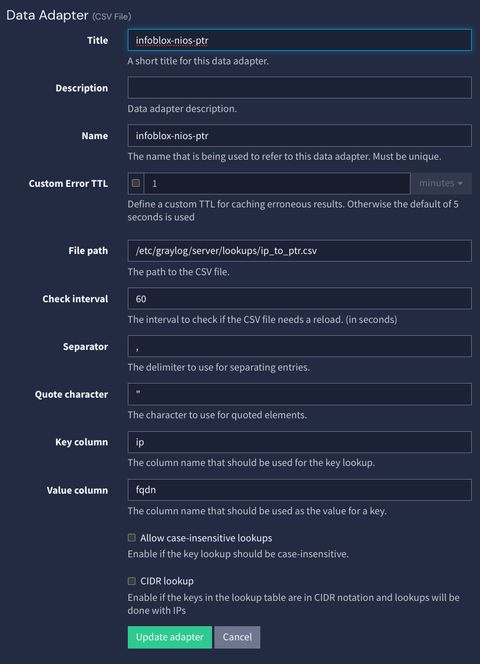
Under System->Lookup Tables->Data Adapters, it's time to create a CSV file adapter. We are keying off IP and client FQDN.
Cache
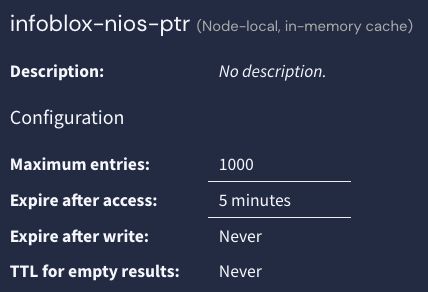
In the same menu, you create a cache for how often you'd like this table to expire. Ensure the time aligns with the timer in your API calls to NIOS.
Lookup Table
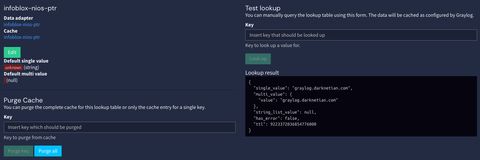
This is the easy part, from here you attach your data adapter and cache, and run a test to ensure Graylog 'sees' the results.
Pipeline Rules
Create a pipeline 'enrichment' and attach all your streams to it. You will create 2 stages that need to run after all your other stages. Notice the offset for me, all my stages are stage 0, enrichment is all stage 1 and 2.
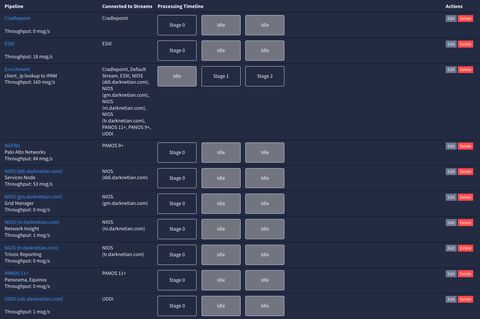
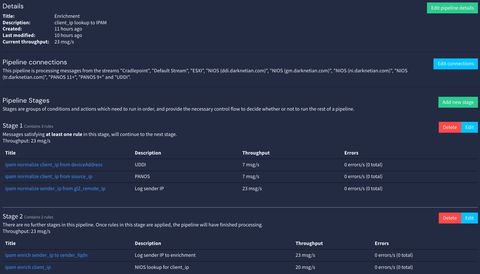
Once you've attached the pipelines, you need to create rules. These rules will modify the messages to ensure new headers are appropriate. My rules:
- normalize client_ip from deviceAddress (UDDI / recursive query source)
- normalize client_ip from source_ip (Palo Alto Networks source)
- normalize sender_ip from gl2_remote_ip (to differentiate between client in a message versus client of log origination)
- enrich sender_ip to sender_fqdn (attach hostnames to sender IPs in all dashboards)
- enrich client_ip (now that it's all normalized, check the lookup table)
Script Examples
rule "ipam normalize client_ip from deviceAddress"
when
  has_field("deviceAddress") && !has_field("client_ip")
then
  set_field("client_ip", to_string($message.deviceAddress));
end
rule "ipam normalize client_ip from source_ip"
when
  has_field("source_ip") && !has_field("client_ip")
then
  set_field("client_ip", to_string($message.source_ip));
end
rule "ipam normalize sender_ip from gl2_remote_ip"
when
  has_field("gl2_remote_ip") && !has_field("sender_ip")
then
  set_field("sender_ip", to_string($message.gl2_remote_ip));
end
rule "ipam enrich sender_ip to sender_fqdn"
when
  has_field("sender_ip")
then
  let ip = to_string($message.sender_ip);
  let fqdn = lookup_value("infoblox-nios-ptr", ip);

  set_field("sender_fqdn", to_string(fqdn));
  set_field("sender_display", concat(concat(concat(to_string(fqdn), " ("), ip), ")"));
end
rule "ipam enrich client_ip"
when
  has_field("client_ip")
then
  let ip = to_string($message.client_ip);
  let fqdn = lookup_value("infoblox-nios-ptr", ip);
  set_field("client_fqdn", to_string(fqdn));
  set_field("client_display", concat(concat(concat(to_string(fqdn), " ("), ip), ")"));
end
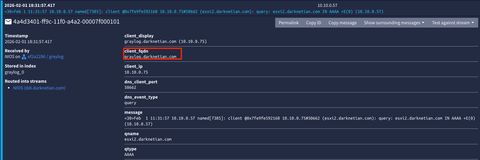
You should now see all messages include a client/sender fqdn.
Maxmind
Maxmind's setup is fairly easy by comparison, Graylog made adopting it simple as the adapaters, pipelines, etc are already preconfigured, you just need to put the .mmdb files in a place that automations will run from. I saw an interesting GitHub repo and thought "might as well."

Host / Automation Config
As always, let's start with creating the landing zone.
sudo mkdir -p /etc/graylog/server/geolite
sudo chown root:root /etc/graylog/server/geolite
sudo chmod 755 /etc/graylog/server/geolite
Next we will create the script to fetch the files.
sudo tee /usr/local/sbin/update-geolite-mmdb > /dev/null <<'EOF'
#!/usr/bin/env bash
set -euo pipefail

DEST_DIR="/etc/graylog/server/geolite"
TMP_DIR="$(mktemp -d)"
cleanup() { rm -rf "$TMP_DIR"; }
trap cleanup EXIT

# "Latest" download URLs from the repo README (git.io redirects)
ASN_URL="https://git.io/GeoLite2-ASN.mmdb"
CITY_URL="https://git.io/GeoLite2-City.mmdb"
COUNTRY_URL="https://git.io/GeoLite2-Country.mmdb"

# Download to temp first (atomic swap after)
curl -fsSL -L "$ASN_URL"     -o "$TMP_DIR/GeoLite2-ASN.mmdb"
curl -fsSL -L "$CITY_URL"    -o "$TMP_DIR/GeoLite2-City.mmdb"
curl -fsSL -L "$COUNTRY_URL" -o "$TMP_DIR/GeoLite2-Country.mmdb"

# Basic sanity: ensure files aren't tiny/HTML error pages
for f in "$TMP_DIR"/*.mmdb; do
  if [[ $(stat -c%s "$f") -lt 100000 ]]; then
    echo "Downloaded file too small (likely error): $f"
    exit 1
  fi
done

# Move into place atomically
install -d -m 755 "$DEST_DIR"
install -m 644 "$TMP_DIR/GeoLite2-ASN.mmdb"     "$DEST_DIR/GeoLite2-ASN.mmdb.new"
install -m 644 "$TMP_DIR/GeoLite2-City.mmdb"    "$DEST_DIR/GeoLite2-City.mmdb.new"
install -m 644 "$TMP_DIR/GeoLite2-Country.mmdb" "$DEST_DIR/GeoLite2-Country.mmdb.new"

mv -f "$DEST_DIR/GeoLite2-ASN.mmdb.new"     "$DEST_DIR/GeoLite2-ASN.mmdb"
mv -f "$DEST_DIR/GeoLite2-City.mmdb.new"    "$DEST_DIR/GeoLite2-City.mmdb"
mv -f "$DEST_DIR/GeoLite2-Country.mmdb.new" "$DEST_DIR/GeoLite2-Country.mmdb"

echo "GeoLite mmdb files updated in $DEST_DIR"
EOF
Create the automation service.
sudo tee /etc/systemd/system/update-geolite-mmdb.service > /dev/null <<'EOF'
[Unit]
Description=Update GeoLite2 MMDB files for Graylog
Wants=network-online.target
After=network-online.target

[Service]
Type=oneshot
User=root
Group=root
ExecStart=/usr/local/sbin/update-geolite-mmdb
EOF
Create the systemd timers.
sudo tee /etc/systemd/system/update-geolite-mmdb.timer > /dev/null <<'EOF'
[Unit]
Description=Run GeoLite2 MMDB updater hourly

[Timer]
OnCalendar=hourly
Persistent=true
RandomizedDelaySec=300

[Install]
WantedBy=timers.target
EOF
Reload your daemons and enable the service.
sudo systemctl daemon-reload
sudo systemctl enable --now update-geolite-mmdb.timer
Created symlink /etc/systemd/system/timers.target.wants/update-geolite-mmdb.timer → /etc/systemd/system/update-geolite-mmdb.timer.
Configuration
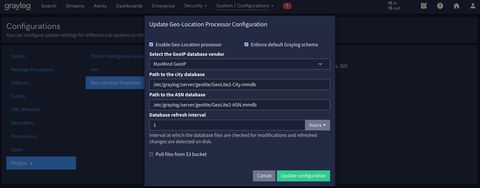
Under System->Configuration->Plugins->Geo-Location Processor, you then just ensure the path to the .mmdb files is updated and runs on the same cadence as your automation. This then allows for data visualizations including destination_geo_coordinates, destination_as_organization, destination_geo_city, and destination_geo_country_iso.
Outcomes
Now just ensure your widgets and dashboards make use of client_fqdn or _display
Spot a typo or want to suggest a change? Edit lands as a PR against the public mirror.