Help! Use Forwarders Only Caused My Outage
Implications of improperly-scoped security policies.
I've previously covered a few important pieces of operations telemetry for the homelab, observability and logging. Although we don't use those same tools internally, I'd like to walk through how I identified a root cause analysis (RCA) of an outage for a customer using similar tools. The context provided is 'we experienced rolling DNS outages across all our sites over the past three days and suspect Infoblox is at fault.' Time to prove the doubters wrong! It is a bit weird to experience a simultaneous authoritative and recursive outage...
Ever heard that meme poem?
- It's not DNS
- There's no way it's DNS
- It was DNS
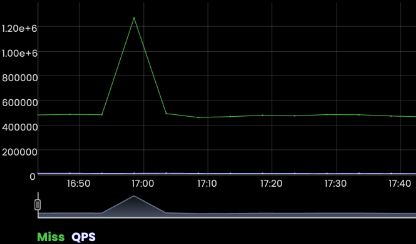
Let's start with my favorite usual suspect: cache hit ratio. Cache hit ratio is a great indicator of health for DNS servers. I talk about this extremely briefly in a post here, but the short is the expectation is CHR is sustained at ~90%. Sure enough, when the customer described the events starting, cache misses spike.
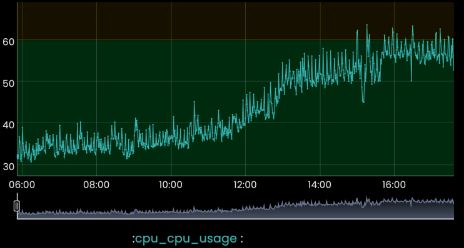
For additional corroboration, we see the CPUs for this server idling much higher before, and sustained during the outage event.
DNS records all have time to live, TTL, which describes how long a DNS server 'holds' it before re-fetching it. Many records have TTLs of 60s, so if you have 1,000 clients asking for a record per second, as opposed to a DNS server fetching it 6M times per minute, it's fetched once and served from cache. When the cache hit drops, it means the server needs to fetch... and from here, problems compound.
Some DNS servers possess a capability to serve records past their TTL (commonly referred to as serve-stale) in the event an upstream fetch is not possible. Essentially 'serve the last known record until a new one is provided.' For this customer, their architecture included a converged authoritative and recursive DNS layer contrary to known best practices. This creates interesting operational outcomes which will be revisited at the end of this blog.
A DNS server holds clients in a queue while it fetches a record on their behalf. This is commonly referred to as recursive client quota. Although configurable, all systems are limited in the number of sockets they hold open for clients based on their physical and virtual resources. When you converge your DNS layers, you artificially limit the number of clients you're able to keep in a holding pattern.
DNS servers possess soft and hard limits. A soft limit, when reached, means it will free other resources to meet the need. These are typically things like programmed pre-fetches (many enterprise DNS servers will pre-fetch google, microsoft, and other queries, for example). A hard limit, when reached, means a client is dropped and will need to re-try the query.
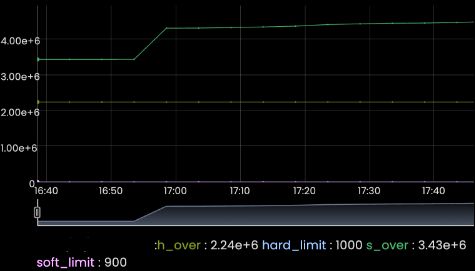
In this case the customer used default settings for soft and hard limits for recursive queries, as is an order of magnitude in overages. Aggressive client retries, against anycasted DNS servers result in a request swarm. At this point, we've validated the rolling brownouts across sites (hard overages don't care if authoritative or recursive, since the layers are converged ALL DNS is affected). This is a proximate cause, but we still are yet to identify why the cache misses increased.
Let's investigate which domains are causing recursive soft limits to be exceeded (names changed to protect the guilty):
| Domain | Query Count |
|---|---|
| debug.vendor.com | 502,139 |
| watchdog.debug.vendor.com | 502,139 |
| service.hyperscaler.com | 12,074 |
| browser.events.data.hyperscaler.com | 6,901 |
| us3.events.data.hyperscaler2.com | 5,356 |
| app1.customer.com | 3,045 |
Interesting. Two separate records are requested a lot (by comparison to other services) for the exact same amount. Let's correlate that stream to identify the top IPs or rather, how many IP's clients exist for those queries.
| Domain | Query Count | Clients Per IP |
|---|---|---|
| debug.vendor.com | 502,139 | 5064 |
| watchdog.debug.vendor.com | 502,139 | 5064 |
| service.hyperscaler.com | 12,074 | 58 |
| browser.events.data.hyperscaler.com | 6,901 | 50 |
| us3.events.data.hyperscaler2.com | 5,356 | 45 |
| app1.customer.com | 3,045 | 33 |
Clients per IP is a server saying 'this is the number of clients asking me for this record right now, I will query it one time to save on resources.' Now we ask the hard question: why are there resolution failures for those records at vendor.com?
In this customer environment the security team enforced that 'Use Forwarders Only' is enabled, which means that in the event your upstream DNS provider is unreachable, do not fail open to root. This is desirable to enforce security policy (use a Protective DNS solution provider for policy, for example), but it does mean that depending on your architecture you are dependent on their availability for your availability.
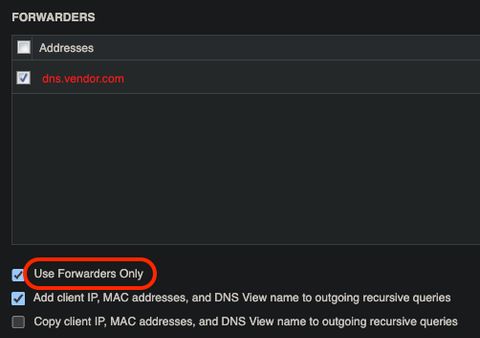
Once we identified the vendor.com domain, a support ticket with their team opened, and they confirmed sure enough during their outage:
- debug.vendor.com and watchdog.debug.vendor.com didn't propagate to all their DNS server POPs
- the servers that did possess the record were unable to serve them at full capacity
- they rolled out a change to their endpoint client that resulted in a high volume of error logs
So, the 'RCA': this customer couldn't use other DNS servers (aside: the hot rfc blog I just wrote would've helped the vendor prevent that), the DNS servers they used didn't have the record they needed (usually), and aggressive client retries and faulty software resulted in rolling worldwide outages of all services as sockets were consumed while our servers waited for the appropriate records.
In a normal world, you receive a SERVFAIL and a client waits ~90s to retry. With serve stale enabled, you get a stale record which pointed nowhere in this case. Prompting the aggressive retry. I spend a lot of time talking about best practice architectures and configurations with my customers. Ultimately another vendor caused harm to the customers networking team's reputation, and negatively impacted their relationship with the security team as their policy didn't allow our solution to mitigate that error.
There are solutions that don't force a tradeoff with security policy and operational availability, which is currently where I spend my time evangelizing. This lesson cost the customer about $2M in productivity, a single checkbox (serve stale or forwarders only disabled).
Spot a typo or want to suggest a change? Edit lands as a PR against the public mirror.